Have you heard about ChatGPT but have no idea where to start?
You are not alone.
Millions of people in the US are using ChatGPT every day to write content, answer questions, build side incomes, and save hours of work. But if you are new to it, the whole thing can feel overwhelming.
This guide cuts through the confusion.
You will learn exactly how to use ChatGPT as a complete beginner — step by step, in plain English. No tech experience required.
What Is ChatGPT?
ChatGPT is an AI chatbot made by OpenAI. You type a message, and it replies — just like texting a very smart assistant.
It can answer questions, write emails, summarize articles, help with homework, create content, and much more.
ChatGPT is powered by a large language model called GPT-4o. It was trained on massive amounts of text. This training allows it to understand your messages and respond in a way that sounds natural and helpful.
Think of it as a highly knowledgeable assistant who never gets tired, never gets frustrated, and is available 24 hours a day.
Is ChatGPT Free to Use?
Yes. ChatGPT has a free version that most beginners will find more than enough.
Here is a quick breakdown of the plans available in 2026:
| Plan | Price | What You Get |
|---|---|---|
| Free | $0/month | GPT-4o mini, basic features, limited usage |
| ChatGPT Plus | $20/month | GPT-4o, faster responses, image generation, priority access |
| ChatGPT Team | $25/user/month | Shared workspace, admin controls |
| ChatGPT Enterprise | Custom | Large teams, advanced security |
Beginner recommendation: Start with the free plan. It is powerful enough to learn the basics and complete real tasks. Upgrade only when you hit a clear limit.
How to Sign Up for ChatGPT (Step by Step)
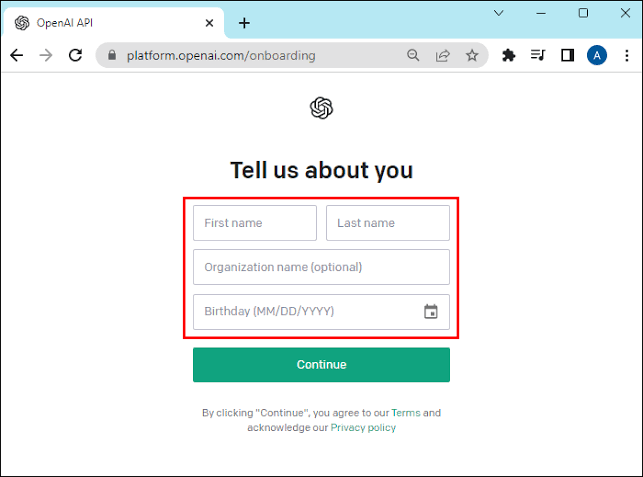
Getting started takes less than 3 minutes.
Step 1 — Go to the website Open your browser and go to chat.openai.com. This is the official ChatGPT website made by OpenAI.
Step 2 — Click “Sign Up” You will see two buttons: Log In and Sign Up. Click Sign Up.
Step 3 — Create your account You can sign up using:
- Your email address
- Your Google account
- Your Microsoft account
- Your Apple ID
Using Google is the fastest option for most people.
Step 4 — Verify your email If you signed up with an email, check your inbox for a verification link. Click it to confirm your account.
Step 5 — Start chatting Once you are logged in, you will see a chat box at the bottom of the screen. Type your first message and press Enter.
That is it. You are now using ChatGPT.
Understanding the ChatGPT Interface
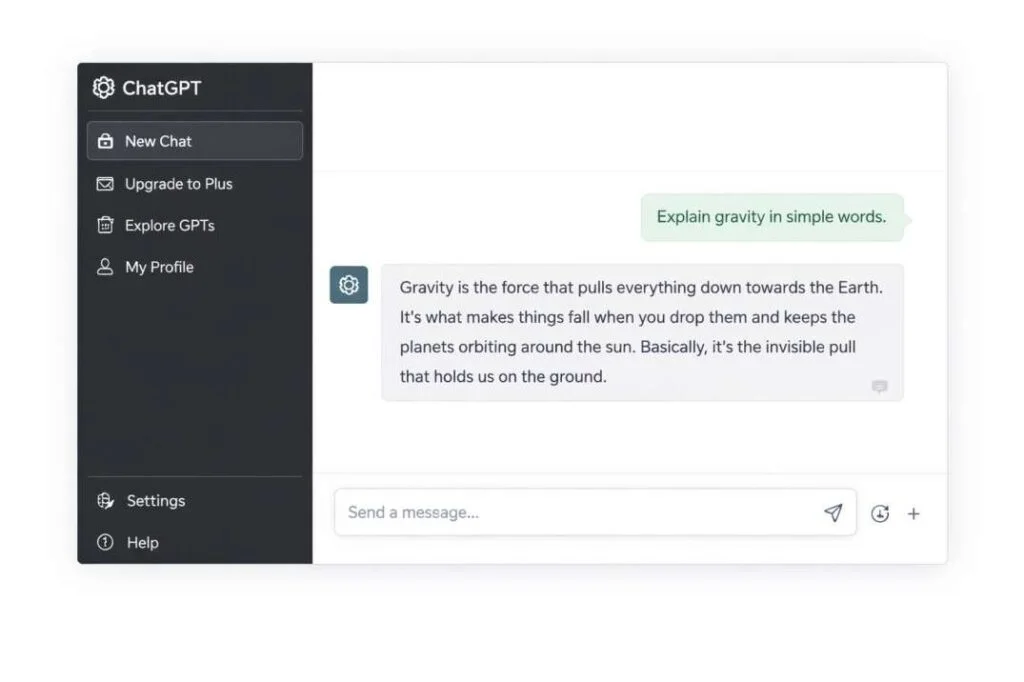
When you first log in, the screen looks simple — and it is.
Here is what you see:
The chat box is at the bottom. This is where you type your messages. These messages are called “prompts.”
The response area takes up most of the screen. ChatGPT’s replies appear here.
The sidebar on the left shows your conversation history. Every chat you have is saved here so you can come back to it later.
The model selector at the top lets you switch between GPT-4o mini (free) and GPT-4o (paid). On the free plan, you mostly use GPT-4o mini.
New Chat button starts a fresh conversation. Use this when you want to start a completely different topic.
One important thing to understand: ChatGPT does not remember previous conversations unless you are in the same chat session. If you start a new chat, it starts fresh.
What Is a Prompt? (And Why It Matters)
A prompt is the message you type to ChatGPT.
The quality of ChatGPT’s response depends almost entirely on how you write your prompt.
A vague prompt gives a vague answer. A specific prompt gives a useful, detailed answer.
Here is a real example:
Weak prompt: Write a blog post.
Strong prompt: Write a 500-word blog post about the benefits of drinking green tea for office workers. Use a friendly, conversational tone. Include 3 specific benefits with one sentence of explanation for each.
The second prompt gives ChatGPT all the context it needs to produce something genuinely useful.
This is the most important skill you will learn as a ChatGPT beginner: writing better prompts.
How to Write a Good ChatGPT Prompt
You do not need to be an expert to write effective prompts. You just need to include the right information.
A strong prompt usually has four parts:
1. The task — What do you want ChatGPT to do? Example: Write an email | Summarize this article | Give me ideas
2. The context — What is the background information? Example: I am a beginner blogger | I work in sales | My audience is college students
3. The format — How should the response look? Example: Use bullet points | Write 3 paragraphs | Make it a numbered list
4. The tone — What style should the response be in? Example: Professional | Casual | Friendly | Simple
When you combine all four, ChatGPT gives you much better output.
Example of a strong prompt using all four parts:
“Write a short Instagram caption (2–3 sentences) for a photo of a morning coffee setup. The audience is working professionals in the US. Keep the tone warm and motivating. End with a relevant hashtag.”
Try that approach with your next prompt and notice the difference.
10 Things You Can Do with ChatGPT Right Now
ChatGPT is useful for hundreds of tasks. Here are ten practical examples to get you started today:
1. Write and edit emails Paste a rough email draft and ask ChatGPT to make it clearer, more professional, or shorter.
2. Summarize long articles Copy and paste any article or document and ask: “Summarize this in 5 bullet points.”
3. Answer questions Ask anything — history, science, cooking, finance, coding. ChatGPT explains topics clearly at whatever level you need.
4. Write blog posts and content Give ChatGPT a topic, an audience, and a tone. It will generate a first draft you can edit and publish.
5. Create social media content Ask for Instagram captions, LinkedIn posts, TikTok scripts, or Twitter thread ideas for any topic.
6. Brainstorm ideas Stuck on what to write, make, or sell? Ask ChatGPT for 20 ideas and pick the best ones.
7. Learn new skills faster Ask ChatGPT to explain any concept in simple terms. It is like having a patient teacher available at any time.
8. Write resumes and cover letters Paste your work experience and ask ChatGPT to write a professional resume or cover letter for a specific job.
9. Translate languages ChatGPT handles translation well across dozens of languages. Paste text and ask it to translate.
10. Write code Even without coding experience, you can describe what you want a program to do. ChatGPT will write the code and explain it.
10 Best ChatGPT Prompts for Beginners
Here are 10 ready-to-use prompts. Copy them, customize the details, and paste them into ChatGPT:
For writing: “Write a professional email to my client explaining that the project deadline has moved by one week. Keep it polite and under 100 words.”
For learning: “Explain [topic] to me like I am 12 years old. Use a simple example to make it clear.”
For social media: “Write 5 Instagram captions for a home-based candle business. Target working women aged 25–40. Keep the tone warm and lifestyle-focused.”
For resume help: “Here is my work experience: [paste details]. Write a professional summary for my resume for a marketing manager position.”
For brainstorming: “Give me 15 blog post ideas for a beginner personal finance blog targeting millennials in the US.”
For productivity: “Create a daily schedule for a freelance writer working 5 hours per day from home. Include breaks and a content creation block.”
For business: “Write a product description for a reusable water bottle. Target environmentally conscious consumers. Keep it under 80 words.”
For studying: “Quiz me on the top 10 facts about World War II. Ask one question at a time and tell me if my answer is correct.”
For problem-solving: “I run a small online store and want to increase sales without spending on ads. Give me 10 specific, actionable ideas.”
For creative writing: “Write the opening paragraph of a mystery novel set in New York City in the 1940s. Use vivid imagery and a tense atmosphere.”
How to Use ChatGPT to Make Money (Beginner Methods)
ChatGPT is not just a learning tool. Millions of people in the US are using it to earn real income.
Here are the most accessible methods for beginners:
Freelance writing with AI assistance Use ChatGPT to produce first drafts, blog posts, and email sequences for clients. Offer your services on Fiverr or Upwork. Beginners earning $300–$1,000 per month within 60–90 days is a realistic starting point.
Social media management Use ChatGPT to create an entire month of social media content for a small business. Many beginners charge $300–$800 per client per month for this service.
AI-assisted blogging Build a niche blog and use ChatGPT to produce regular content. Monetize through affiliate links and display ads. This takes 3–6 months to build income but becomes passive over time.
Resume and cover letter writing Offer a resume writing service on Fiverr. Use ChatGPT to produce high-quality resumes fast. Many freelancers charge $30–$100 per resume.
Sell digital products Use ChatGPT to create ebooks, guides, and templates. Sell them on Gumroad or Etsy. One product can generate passive income for months.
The key insight is this: ChatGPT does not replace your effort. It multiplies it.
ChatGPT Tips and Tricks for Beginners
These are the habits that separate users who get great results from those who get frustrating ones.
Ask for a rewrite when the answer is not right If ChatGPT gives you something off-target, do not give up. Say: “That is not quite what I needed. Try again with a more [casual / specific / shorter] approach.”
Give it context about yourself At the start of a chat, tell ChatGPT who you are. For example: “I am a beginner blogger targeting US women aged 30–45 interested in personal finance.” This makes every response more relevant.
Ask follow-up questions You do not have to write one perfect prompt. Have a conversation. Ask follow-ups. Say “Give me more examples” or “Make the second paragraph shorter.”
Use it as an editor, not just a writer Paste your own writing and ask ChatGPT to improve it. This is often more effective than asking it to write from scratch.
Save your best prompts When you find a prompt that gives you great results, save it in a notes app. Build your own personal prompt library over time.
Tell it to be honest If you want critical feedback rather than positive reinforcement, say: “Be honest and tell me what is wrong with this.” ChatGPT tends to be encouraging by default.
Common Beginner Mistakes to Avoid
These mistakes are extremely common. Knowing them in advance will save you a lot of frustration.
Publishing AI content without editing ChatGPT produces drafts, not finished articles. Always read and edit the output before using it professionally. Unedited AI text often sounds generic and repetitive.
Expecting it to know your personal situation ChatGPT does not know anything about you unless you tell it. Give it the context it needs.
Using it for sensitive medical or legal advice ChatGPT can give general information, but it is not a doctor or lawyer. Always verify health and legal information with a qualified professional.
Trusting it completely for facts ChatGPT can be wrong, especially about recent events. Its training data has a cutoff date. Always verify important facts from reliable sources.
Giving up after one bad response A bad first answer does not mean ChatGPT cannot help you. Rephrase your prompt, add more context, or break your request into smaller steps.
ChatGPT Free vs Paid: Which Should You Choose?
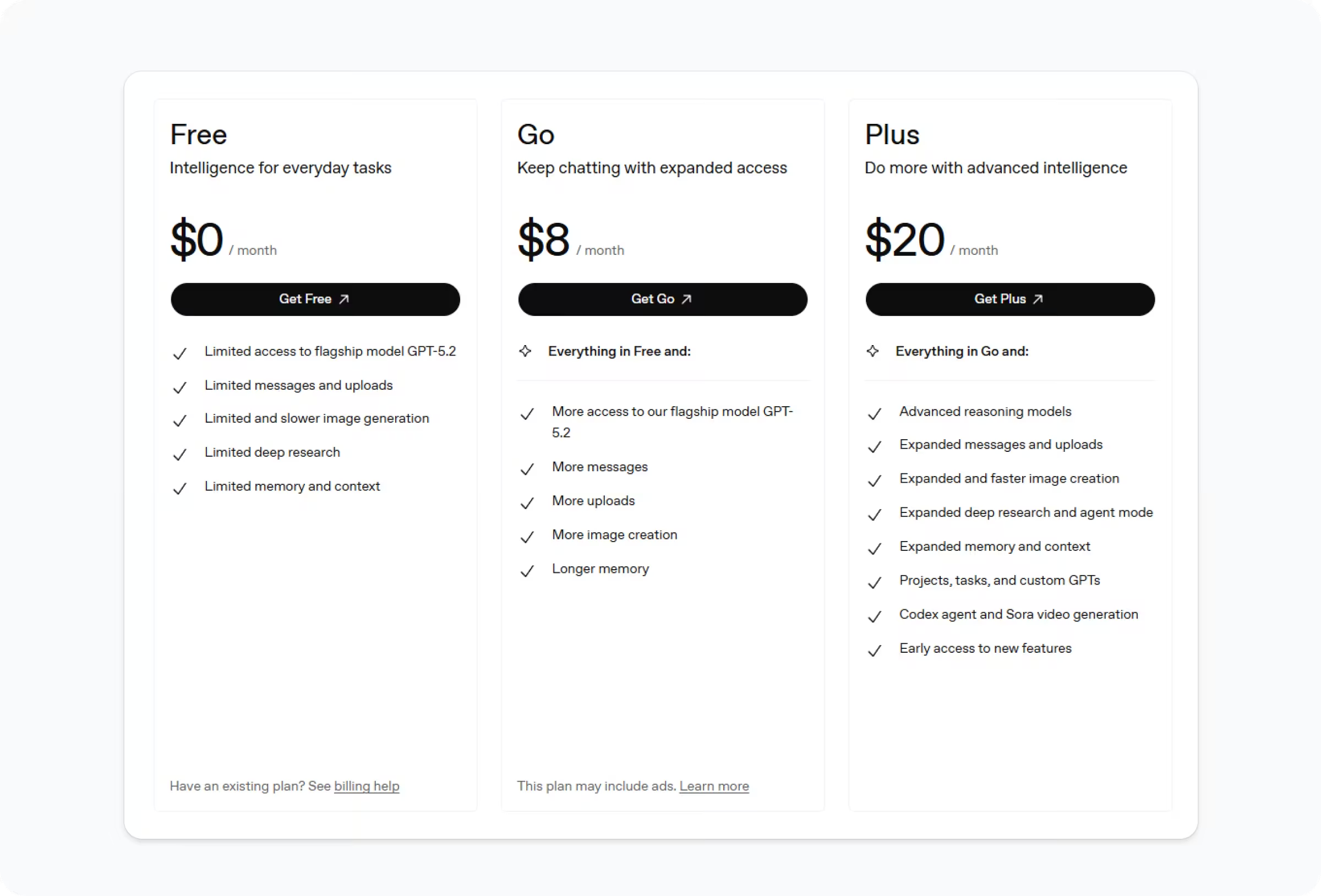
This is one of the most common beginner questions.
Stay on the free plan if:
- You are just learning how ChatGPT works
- You do not need image generation
- Your daily usage is light (a few conversations per day)
- You are not yet making money from your ChatGPT use
Upgrade to ChatGPT Plus ($20/month) if:
- You use ChatGPT heavily for work or freelancing
- You need faster response times
- You want access to image generation (DALL-E 4)
- You want priority access during peak hours
For most beginners, the free plan is the right starting point. Start there, learn the basics, and upgrade only when the limits are genuinely holding you back.
ChatGPT vs Other AI Tools: How Does It Compare?
ChatGPT is the most popular AI chatbot in 2026, but it is not the only one. Here is a quick comparison:
| Tool | Best For | Free Plan |
|---|---|---|
| ChatGPT | General tasks, writing, learning | ✅ Yes |
| Claude | Long documents, nuanced writing | ✅ Yes |
| Gemini | Google Workspace integration | ✅ Yes |
| Perplexity | Research with citations | ✅ Yes |
| Copilot | Microsoft Office users | ✅ Yes |
As a beginner, start with ChatGPT. It has the most tutorials, the largest community, and the widest range of capabilities. Once you are comfortable, explore the others for specific tasks.
Frequently Asked Questions
Is ChatGPT free for beginners?
Yes. ChatGPT has a free plan that gives beginners full access to GPT-4o mini, unlimited conversations (with some daily limits), and most core features. The free plan is enough to learn ChatGPT and complete real tasks. You do not need to pay anything to get started.
What can ChatGPT do for a complete beginner?
ChatGPT can help beginners write emails, summarize articles, answer questions, create social media posts, brainstorm ideas, write resumes, learn new topics, and much more. You do not need any technical skills to use it — just type your request in plain English and read the response.
How do I write a good prompt for ChatGPT?
A good ChatGPT prompt includes four things: the task you want done, relevant background context, the format you want the response in, and the tone you want. Instead of “Write a blog post,” try “Write a 400-word blog post about meal prepping for busy professionals. Use a friendly tone and include three actionable tips.”
Can ChatGPT make mistakes?
Yes. ChatGPT can produce incorrect information, especially about recent events or specific facts. It should not be used as the final source for medical, legal, or financial decisions. Always verify important facts from trusted, authoritative sources before acting on them.
How do beginners make money with ChatGPT?
The most beginner-friendly methods are freelance writing, social media management, and resume writing services. These can be offered on Fiverr, Upwork, or LinkedIn. Many beginners earn their first $100–$300 within the first 30–60 days by offering AI-assisted services. Blogging and digital products are slower to start but build passive income over time.
What is the difference between ChatGPT free and ChatGPT Plus?
ChatGPT free uses GPT-4o mini and has daily usage limits. ChatGPT Plus costs $20 per month and gives access to GPT-4o (the more powerful model), faster responses, image generation with DALL-E 4, and priority access when servers are busy. For most beginners, the free plan is sufficient to start.
Is ChatGPT safe to use?
Yes, ChatGPT is safe for general use. OpenAI has built safety guidelines into the system to prevent harmful outputs. However, you should avoid sharing personal information like passwords, financial details, or sensitive data in your ChatGPT conversations. Treat it like any other online platform — use it carefully.
How many messages can I send on the free plan?
ChatGPT’s free plan limits GPT-4o usage to a set number of messages per day. Once that limit is reached, it switches to GPT-4o mini, which is less powerful but still useful for basic tasks. The exact limit varies and can change, so the free plan works best for light to moderate daily use.
Do I need to download anything to use ChatGPT?
No. ChatGPT works entirely in your browser at chat.openai.com. However, OpenAI does have official apps for iOS and Android if you prefer to use it on your phone. The mobile apps are free and work exactly like the browser version.
What is ChatGPT mostly used for in the United States?
In the US, the most popular uses for ChatGPT include content writing, studying and research, coding help, business productivity, email writing, and side hustle income. Students use it for learning. Professionals use it to save time. Freelancers use it to serve more clients. Entrepreneurs use it to build businesses faster.
Final Thoughts
ChatGPT is one of the most useful tools available to anyone with a computer and an internet connection.
You do not need experience. You do not need to pay. You just need to start.
Type your first prompt today. Make it something simple — ask ChatGPT to explain something you have always wanted to understand, or ask it to help you write something you have been putting off.
The more you use it, the better your prompts will get. And the better your prompts get, the more valuable it becomes.
Start simple. Stay curious. Let AI do the heavy lifting.